
Blog
Dahua NVR vs DVR: Which Recorder Is Right for You?

Key Takeaways
This guide explains the practical differences between Dahua NVR and DVR systems to help homeowners and small business owners choose the right CCTV recorder for their property.
- NVR systems work with IP cameras over Ethernet and deliver higher resolution footage, built in audio, and easier remote access, making them the stronger choice for new installations or properties without existing cabling.
- DVR systems use coaxial cables and analog cameras and remain a practical option for properties that already have coaxial infrastructure in place, where a full rewire would be costly or disruptive.
- Camera compatibility is the most immediate constraint: NVRs require IP cameras and DVRs require analog cameras, so your existing hardware largely determines which recorder type is realistic without added expense.
- Full feature compatibility including AI analytics and smart detection such as WizSense person and vehicle detection requires matched cameras and recorders from the same manufacturer ecosystem rather than mixed brand setups.
- Hidden costs worth accounting for before purchase include PoE switches for NVR setups, coax baluns for HD analog DVR setups, and surveillance grade hard drives, as standard desktop drives are not suitable for continuous recording.
If you are comparing a Dahua NVR vs DVR for your home or small business, you are already asking the right question. The recorder you choose shapes everything else about your CCTV system, from the cameras you can use to the quality of footage you will see on screen. Understanding the difference before you spend anything is the most practical step you can take, and this guide walks you through exactly that.
This article sits within a broader Dahua camera comparison guide covering the full range of Dahua equipment decisions. Here, the focus is specifically on recorders: what NVRs and DVRs actually do, how they compare in real-world conditions, and which one is likely to suit your property. Topics such as IP CCTV vs analog CCTV and XVR recorders explained are covered separately within this series.
Table of Contents
What Is the Difference Between a Dahua NVR and DVR?
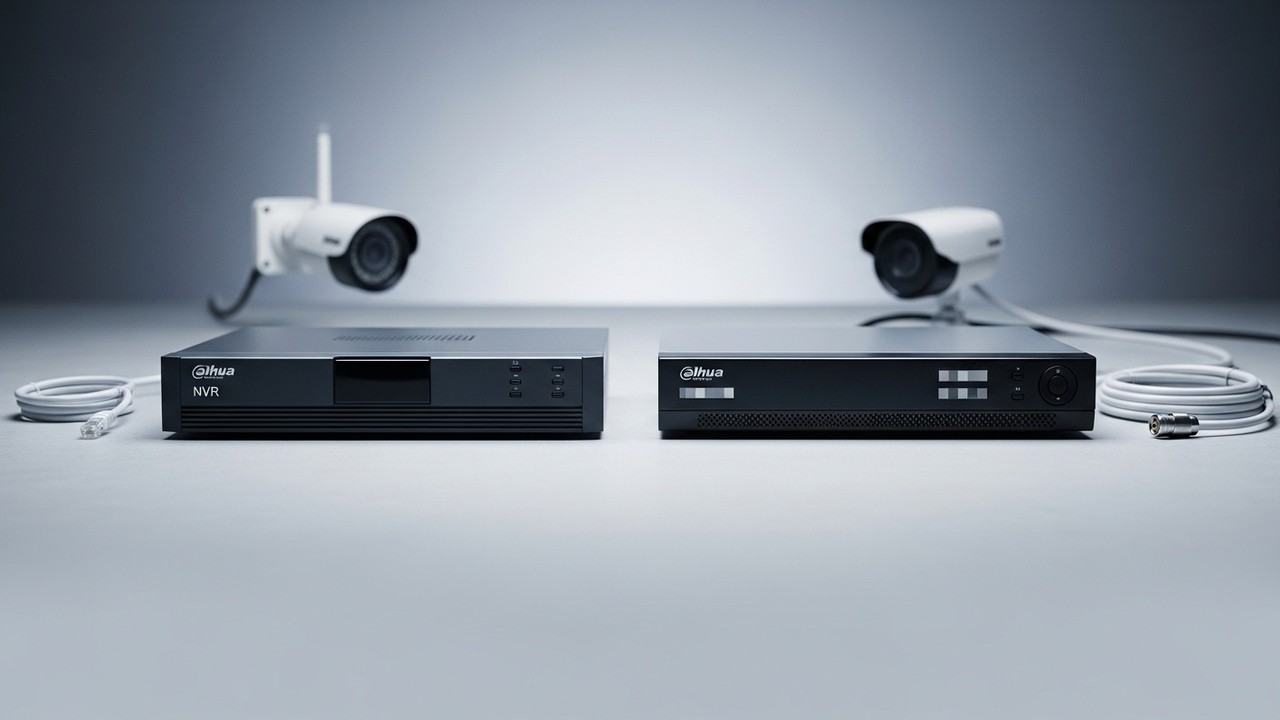
The core difference comes down to the type of cameras each recorder supports and how video is processed.
A DVR (Digital Video Recorder) connects to analog cameras via coaxial cables. The cameras capture raw video, and the DVR handles all encoding and storage centrally. This has been a reliable method for decades and remains common across properties throughout Greater Manchester and the wider North West today. The system works locally without depending on a network connection.
An NVR (Network Video Recorder) receives pre-encoded video streams from IP cameras over an Ethernet network, rather than processing raw signals itself. Each IP camera has its own built-in processor, while the recorder focuses on storage, management, and remote access. That architectural difference has real consequences for image quality, flexibility, and how well the system fits into a modern property.
NVR vs DVR: Core Differences Compared
Understanding how these two recorder types differ across practical categories helps you identify which is the right fit for your property from the outset.
- Camera type: NVRs use IP cameras; DVRs use analog cameras
- Cabling: NVRs use Ethernet with PoE; DVRs use coaxial cable
- Image quality: NVRs support higher resolutions; DVRs are typically limited to 2K
- Audio: NVRs often include built-in audio recording; DVRs generally do not
- Remote access: NVRs are better suited to remote viewing; DVRs operate more independently of your network
| Feature | NVR | DVR |
|---|---|---|
| Camera type | IP cameras | Analog cameras |
| Cabling | Ethernet (PoE) | Coaxial cable |
| Image quality | Higher resolution supported | Typically limited to 2K |
| Built-in audio recording | Often included | Generally not included |
| Remote access | Better suited; network-connected by design | Possible; depends on router and broadband |
| Network dependency | Requires network for full functionality | Operates independently of broadband |
| AI and smart features | Fully supported with matched Dahua cameras | Limited |
Image Quality: NVR vs DVR
NVR systems consistently deliver higher resolution footage. DVR systems are typically capped at standard definition to 2K, and coaxial cables can suffer signal degradation over longer runs. For a small terraced house, common across areas like Salford, Stretford, or Oldham, coaxial range is usually adequate. For a larger property with cameras spread across outbuildings, signal loss becomes a genuine limitation worth planning around.
NVR systems also tend to support built-in audio recording, which DVR systems generally do not. If footage quality and audio are priorities, NVR is the stronger choice.
Cabling and Installation Requirements
In a new-build property where cabling decisions are still open, an NVR with Power over Ethernet (PoE) cameras is almost always the better starting point. A single Ethernet cable carries both data and power to each camera, which is significantly simpler than running separate coaxial and power cables for a DVR setup.
For older properties, including the many Victorian terraces and converted commercial buildings found across Manchester city centre, Stockport, and surrounding areas, that already have coaxial cable in the walls, replacing that infrastructure just to move to NVR may not be cost-effective. DVR systems remain a practical choice where rewiring would be disruptive or too costly.
Network Bandwidth and NVR Performance
Because an NVR routes camera data through your network, bandwidth matters, especially for larger setups. For most domestic or small commercial installations running four to eight cameras, this is rarely a problem. It is still worth checking your router’s capability before committing, particularly if you plan to view footage remotely while it is being recorded.
DVRs operate independently of your broadband router for local recording, which can be an advantage in properties with unreliable internet.
Choosing the Right Recorder for Your Property Type
New Builds and Fresh Installations
Go with an NVR. PoE cabling is cleaner, installation is simpler, and you will have a stronger foundation for adding cameras or AI features later. This applies particularly to new-build estates and commercial developments across areas such as Ancoats, MediaCityUK, and the wider Greater Manchester region.
Older Properties with Existing Coaxial Cable
A DVR replacement may be the most practical short-term decision, especially if your analog cameras still produce usable footage. If you plan to expand the system, add remote monitoring, or integrate smart detection features, upgrading to NVR becomes worth considering.
Small Retail Units and Commercial Buildings
If the site already has coaxial infrastructure and there are no immediate plans to scale up, a DVR can continue to serve well. For businesses planning to grow their camera count or enable central monitoring across sites, common for multi-unit operators in areas like the Northern Quarter or Trafford Park, NVR is the better long-term investment.
NVR vs DVR: Cost Comparison
Any honest comparison must go beyond the recorder price. The true cost of each system includes cameras, cabling, power supplies, and potentially installation labour.
NVR systems built around IP cameras tend to carry a slightly higher per-camera cost, though that gap has narrowed considerably in recent years. As a reference point, 16-channel NVRs from vendors including Dahua are available in the £600 to £750 range, according to IPVM. Prices vary and it is worth checking current availability directly with your supplier.
Additional Costs to Factor In Before You Buy
- PoE switch: If your NVR does not have a built-in PoE switch, you will need a separate one to power IP cameras.
- Coax baluns: DVR setups using HD analog cameras may need baluns to adapt the signal, and older coaxial cable may not support modern HD analog resolutions.
- Surveillance-grade hard drives: Standard desktop drives are not recommended for continuous CCTV recording. Budget for purpose-built surveillance drives on both system types.
| Cost Factor | NVR | DVR |
|---|---|---|
| Per-camera cost | Slightly higher | Generally lower |
| Cabling cost | Lower (single Ethernet cable per camera) | Higher (separate coaxial and power cables) |
| PoE switch | Required if not built into NVR | Not applicable |
| Coax baluns | Not applicable | May be needed for HD analog cameras |
| Surveillance-grade hard drive | Required | Required |
| Rewiring for existing properties | May be needed if switching from coaxial | Not needed if coaxial already installed |
Upgrading or Replacing an Existing CCTV System
If you already have Dahua analog cameras and simply need to replace a failed recorder, a compatible Dahua DVR will restore functionality without requiring any camera changes.
If you are starting from scratch or want to meaningfully improve your system’s capability, an NVR-based setup built on Dahua IP cameras gives you a stronger long-term foundation.
Full feature compatibility, including AI analytics, smart search, and remote access, typically requires cameras and recorders from the same manufacturer’s ecosystem. For Dahua products specifically, features such as WizSense person and vehicle detection are only fully unlocked when using matched Dahua cameras with Dahua recorders. Mixing brands through ONVIF can work for basic recording but often limits advanced functionality.
Some hybrid XVR recorders accept both analog and IP camera inputs, offering a transitional option for buyers migrating from legacy DVR infrastructure. If your setup involves a mixed camera environment, the dedicated XVR article in this series is worth reading alongside this one.
When to Consult a Professional Before Buying
For most domestic and straightforward small business setups, this guide gives you enough to make a confident decision. There are situations, however, where a brief consultation is genuinely worthwhile before purchasing:
- Commercial premises with multiple access points or complex layouts
- Listed buildings where external drilling may require permission
- Multi-site properties that need centrally managed footage
- Rented commercial spaces where tenancy agreements affect camera placement
It is also worth verifying that your broadband connection supports stable remote access if that is a priority. A conversation with a specialist can prevent a wasted purchase and ensure your system is both legally compliant and practically deliverable for your specific property.
How CUCCTV Can Help You Choose in Manchester
CUCCTV stocks a full range of Dahua NVR and DVR systems as an authorised UK Dahua partner. Every product is genuine, warranted, and backed by manufacturer support. Whether you are replacing a failed unit or speccing out a complete system from scratch, the range covers domestic kits through to multi-channel commercial setups.
Trade account holders benefit from a dedicated account manager who can confirm camera and recorder compatibility, advise on PoE switches and hard drives, and help you avoid costly oversights before installation begins. For customers who prefer to see products in person, CUCCTV’s store in Manchester offers hands-on access and face-to-face advice from staff who work with this equipment every day. There is also a store in Huddersfield for customers across West Yorkshire.
If you are ready to move forward or want to talk through your options first, reach out to the CUCCTV team. Whether you visit in store, browse online, or speak with an account manager directly, the goal is straightforward: helping you choose the right recorder for your property with confidence.

Frequently Asked Questions
Can I use a Dahua NVR with my existing analog cameras?
No. Dahua NVRs are designed for IP cameras only and cannot accept analog camera signals directly. If you want to keep your existing analog cameras, a Dahua DVR or a hybrid XVR recorder is the appropriate choice. Moving to a full NVR setup requires replacing your cameras alongside the recorder.
Is a Dahua NVR harder to set up than a DVR?
Not significantly. NVR installation is often simpler in new-build properties because a single PoE Ethernet cable handles both data and power per camera. DVR setups require separate coaxial and power cables for each camera. The main complexity with NVR is ensuring your network and router are configured correctly for remote access.
Can I view Dahua NVR or DVR footage remotely on my phone?
Yes, both system types support remote viewing via the Dahua DMSS app. NVR systems generally offer more reliable remote access because they are network-connected by design. DVR remote access depends on your broadband stability and router configuration, which can vary between properties.
Does a Dahua NVR require a separate PoE switch?
It depends on the model. Many Dahua NVRs include built-in PoE ports that power IP cameras directly without additional hardware. Models without built-in PoE require a separate PoE switch. Always check the specific NVR specification before purchasing to avoid an unexpected additional cost.
Will mixing Dahua cameras with a non-Dahua recorder affect performance?
Basic recording usually works via ONVIF compatibility, but advanced features such as WizSense AI detection, smart search, and full remote management are typically only available when using matched Dahua cameras with Dahua recorders. For full functionality, staying within the Dahua ecosystem is strongly recommended.
Which Dahua recorder is better for a small home with four cameras?
For a new installation, a Dahua NVR with PoE is the most practical choice. It is clean to install, supports higher resolution cameras, and allows easy expansion later. If your home already has coaxial cable installed, a DVR is a cost-effective option that avoids the need for rewiring.
